



Picture Contributions

Request movie additions or contribute pictures.
Post a new topic Post a reply
Author
Message
Post subject: Picture Contributions Post Posted:
User avatar
Joined: 27 Sep 2005
Posts: 8387
We'll gladly receive your picture contributions at this address:

Image

You can send pictures of:
movies (preferably english theatrical posters)
persons (preferably photographs from real life, like photo calls, ceremonies, etc...)
characters (preferably movie captures)


Naming the pictures

In order to process your contributions efficiently, it's very important that the pictures are correctly named. You must use Coollector to have the exact name.

Coollector will COPY the correct name into the clipboard, and then you'll be able to PASTE it back from the Clipboard (using Control + V, or Command + V on a Mac).

For Coollector to copy the name into the clipboard, you must press Control + click (Command + click on a Mac) on either the movie picture, or the person picture, or an actor in the movie cast.
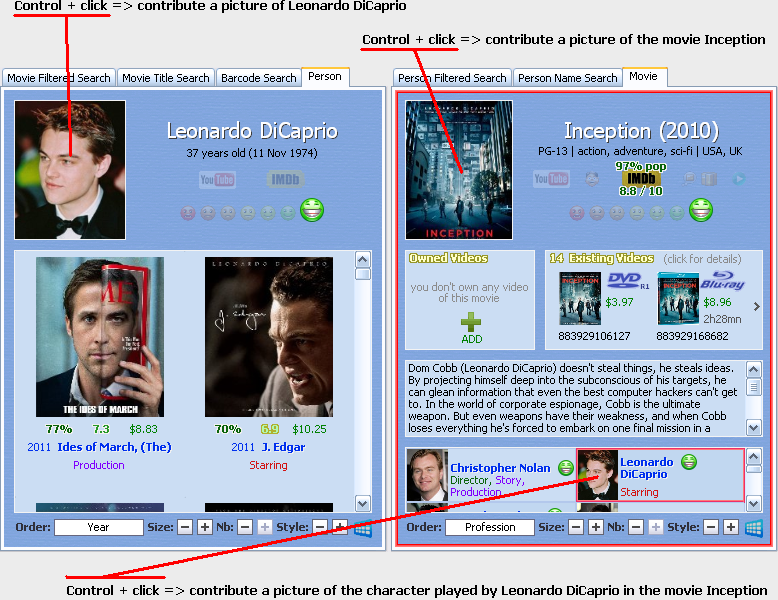

Image


Send the largest picture that you have (we'll resize it or crop it if necessary).

And of course, we won't accept watermarked pictures.


Reminder: you can earn a contributor code by contributing 100 character pictures

Instructions are on this page: earn.html
Last edited by (cool) Hector on 13 Aug 2010 20:11, edited 14 times in total.
Profile
Quote
haj
Post subject: Re: Picture Contributions Post Posted:
Joined: 01 Mar 2013
Posts: 44
When I control & click on any of these three areas all my computer does is open a google search. I am trying to get the numerical filenames so I can cut & paste them to the pictures I have but I can't bring them up. What am I doing wrong?
Profile
Quote
Post subject: Re: Picture Contributions Post Posted:
User avatar
Joined: 27 Sep 2005
Posts: 8387
haj wrote:What am I doing wrong?
If you've triggered the google search, it means that you've done everything right :D

What you haven't realized, because it's invisible, it's that Coollector has placed the correct file name inside the clipboard. You can now paste from the clipboard by pressing CONTROL + V. You'll do that to give the right name to the picture when you'll save it to your disk.

Is it clear enough?
Profile
Quote
Post subject: Re: Picture Contributions Post Posted:
Joined: 22 Feb 2014
Posts: 2
Awful Nice artwork was missing and I could not manually add it to my collector so I thought to upload it and maybe this will help clarify how to contribute.
Attachments
awful_nice_xlg.jpg
Profile
Quote
Post subject: Re: Picture Contributions Post Posted:
User avatar
Joined: 27 Sep 2005
Posts: 8387
geomatrixx wrote:Awful Nice artwork was missing
Thank you! I've added it, it's now online. If it doesn't show on your computer, you might have to restart the program.

geomatrixx wrote:I could not manually add it to my collector
Yes, you have to contribute it, for the benefit of everyone.

geomatrixx wrote:maybe this will help clarify how to contribute.
The right way to contribute pictures it to mail them to this address: pictures at coollector dot com

Please note that it's important to correctly name the pictures, as explained above (Control + Click... clipboard... etc... please ask me if there's something difficult to understand).

In the case of the Awful Nice poster, the right name would have been:

Awful Nice (2013) [0094318].jpg

;)
Profile
Quote
Post subject: Re: Picture Contributions Post Posted:
Joined: 22 Feb 2014
Posts: 2
It is almost completely clear now except the naming of the picture.Where did you get [0094318] in the name?
Profile
Quote
Post subject: Re: Picture Contributions Post Posted:
User avatar
Joined: 27 Sep 2005
Posts: 8387
geomatrixx wrote:Where did you get [0094318] in the name?
You have nothing to do to get the correct name. As soon as you control + click, the program puts the correct name into the clipboard, in this case "Awful Nice (2013) [0094318].jpg".

If you have the picture on your disk, it doesn't have the right name, so you have to rename it. Go to rename it, and instead of typing a new name, you'll type control + V to paste the value from the clipboard.

If you find the picture on the internet, at the moment of saving the picture to your disk, the browser will let you decide which name you want to give to the picture file. you'll control + V to save it with the right name from the clipboard.

As you can see, it's easy on your side (once you've understood), and it's much easier for me too to process your contributions.
Profile
Quote
Post subject: Re: Picture Contributions Post Posted:
User avatar
Joined: 25 May 2012
Posts: 5
Mansfield Park (1999) [0006988] incorrect poster/Art work
Attachments
Mansfield Park (1999) [0006988]
Profile
Quote
Post subject: Re: Picture Contributions Post Posted:
User avatar
Joined: 27 Sep 2005
Posts: 8387
Fixed, thank you!
Profile
Quote
Post subject: Re: Picture Contributions Post Posted:
Joined: 05 Nov 2015
Posts: 1
dear admin,

how do i know which person in the database that already has a picture yet?
Profile
Quote
Post subject: Re: Picture Contributions Post Posted:
User avatar
Joined: 27 Sep 2005
Posts: 8387
wiradhaksinarga wrote:how do i know which person in the database that already has a picture yet?
Why do you ask this question? Aren't the pictures downloaded while you use the program?
Profile
Quote
Post subject: Re: Picture Contributions Post Posted:
Joined: 27 May 2016
Posts: 5
windows 10 doesn't have a clip board
Profile
Quote
Post subject: Re: Picture Contributions Post Posted:
User avatar
Joined: 27 Sep 2005
Posts: 8387
artistheat wrote:windows 10 doesn't have a clip board
Windows 10 has a clipboard, of course! I have Windows 10 on my computer, and it's like all the other Windows...

Control + C => copy to clipboard.
Control + V => paste from clipboard.

When you contribute a picture, Coollector puts the right file name into the clipboard for you. You just have to rename the picture using Control + V so the picture has the right name.
Profile
Quote
Post subject: Re: Picture Contributions Post Posted:
Joined: 01 Aug 2018
Posts: 11
Bandslam (2009) [0054559].jpg

The artwork for Bandslam is incorrect. Could someone please correct it. Thank you.
Profile
Quote
Post subject: Re: Picture Contributions Post Posted:
User avatar
Joined: 27 Sep 2005
Posts: 8387
keithlovesmovies wrote:The artwork for Bandslam is incorrect.
Fixed, thank you!
Profile
Quote
Post a new topic Post a reply